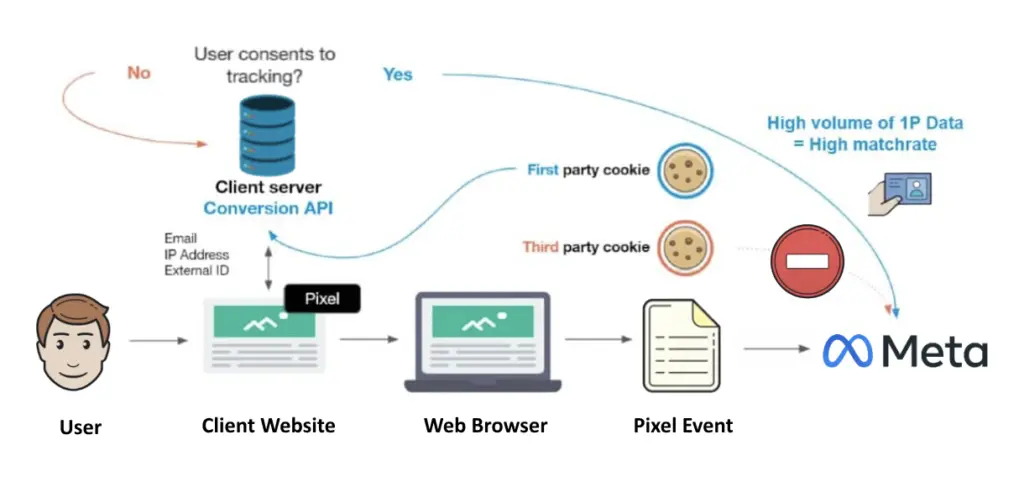
If you are relying solely on the Meta Pixel to track your sales and leads, you are likely seeing only part of the picture. Between Apple's iOS privacy changes and the increasing use of ad blockers, client-side data is becoming notoriously unreliable. The result is "missing" conversions, incorrect attribution, and ultimately, inefficient ad spend because the algorithm doesn't know what's working.
The alternative is Server-Side Tracking via Meta's Conversions API (CAPI). By sending data directly from a backend server—like n8n—to Facebook, you bypass the browser entirely. This guide will walk you through how to implement this using n8n to ensure your data is accurate, secure, and actionable.
Watch the step-by-step guide on implementing this server-side tracking workflow:
Why Pixel-Based Tracking is Failing
To understand the solution, we must first understand the problem with the traditional Pixel.
- Ad Blockers: Many users install extensions that block tracking scripts entirely.
- iOS Privacy Updates: Apple users can opt out of tracking, severing the link between the ad click and the conversion.
- Cookie Blocking: Browsers like Firefox and Safari strip out third-party cookies by default.
This creates a "blind spot" for marketers. You might spend $100 to get a customer, but because the pixel was blocked, Facebook thinks you got zero results. Consequently, the algorithm stops serving ads to that winning audience. Server-side tracking solves this by allowing your server (n8n) to talk directly to Meta's server, ensuring the data gets through regardless of the user's browser settings.
The n8n Server-Side Workflow Explained
Implementing CAPI might sound like a task for a senior developer, but with n8n, it becomes a visual workflow. The core objective is to take your conversion data (leads, purchases) and send it to Meta in a format they accept.
1. The Trigger: Catching the Data
The workflow starts with a trigger. This could be a Webhook receiving data from your website, a form submission, or even a message in Slack indicating a closed deal. In an ideal world, you want to capture as much data as possible at this stage: First Name, Last Name, Email, Phone, and crucially, the FBC (Click ID) and FBP (Browser ID).
However, even if you can't capture the technical Click IDs immediately, sending the Email and Phone Number is the "20% of work that yields 80% of results." This first-party data allows Meta to match the conversion back to a user profile.
2. Data Normalization: Cleaning the Input
Meta is extremely strict about the format of data it receives. If you send an email with a capital letter, the match might fail. Therefore, the first step in n8n is "Normalization."
- Emails: Must be converted to lowercase.
- Phone Numbers: Must be stripped of symbols (like + or -) and include country codes.
- Names: Should also be lowercased for consistency.
Using a simple Code Node or n8n's expression editor, you can automatically clean every piece of data that comes through the pipeline.
3. Hashing: The Security Layer
You cannot simply send a raw email address to Facebook; that would be a privacy violation. Meta requires all Personally Identifiable Information (PII) to be "hashed" using the SHA-256 algorithm. This turns `john@example.com` into a string of random-looking characters.
In n8n, you can use the Crypto Node to apply SHA-256 hashing to your normalized email and phone fields. This ensures you are compliant with privacy standards while still allowing Meta to match the hashed data against their own hashed user database.
4. The Conversion Timestamp
Timing is everything. You need to tell Meta exactly when the conversion happened. You can generate a UNIX timestamp within n8n to mark the precise second the lead came in or the sale was made. This helps the ad algorithm understand the "time to conversion."
5. The API Request: Sending to Meta
Once your data is normalized, hashed, and timestamped, it's time to send it. We use the HTTP Request Node to POST data to the Meta Graph API.
To do this, you will need a Meta Access Token. You can generate a permanent token in your Facebook Business Manager settings (under Events Manager > Implementation > Generate Access Token). Unlike other APIs that require constant refreshing, this token lasts forever, making your automation stable and low-maintenance.
The "Event Match Quality" Score
After you start sending data, Facebook will grade you. In your Events Manager, you will see an "Event Match Quality" score ranging from 0 to 10.
A score of 1–6 usually indicates poor attribution. To get a high score (8+), you need to send more than just email. You need:
- IP Address: The user's internet address.
- User Agent: Detailed browser info.
- FBC/FBP: Facebook's specific click and browser IDs.
While gathering IP and User Agent data requires more advanced Meta Ads automation strategies, simply sending hashed emails and phones via n8n is a massive improvement over pixel-only tracking. It acts as a safety net for your data.
Limitations and Alternatives
Server-side tracking is powerful, but it isn't magic. It operates within the "walled garden" of Meta. It doesn't inherently solve cross-channel attribution—for example, if a user sees your Facebook Ad, clicks, but then buys later via a Google Search.
For businesses spending significant figures, you might eventually look into advanced attribution tools like Hyros or Triple Whale, or fingerprinting technologies. However, for most SMEs in Singapore, a robust n8n server-side workflow is the most cost-effective way to immediately fix data leakage.
Why Choose Osinity?
Setting up CAPI, managing encryption, and handling API tokens can be technically daunting. If you mess up the hashing, your ads won't optimize, and you'll burn cash.
At Osinity, we specialize in building these robust workflow automation solutions. We don't just guess; we implement proven n8n architectures that ensure your marketing data is accurate.
We believe in our work so much that we offer a risk-free 30-day validation period. We build the tracking system, you verify the data accuracy, and you only pay if it works as promised. No risk, just better ROI.
Ready to stop guessing where your sales are coming from? Partner with Osinity to implement server-side tracking today.